FROM BASH (in 2026):
This piece was originally published on our NoBlogs in December of 2025.
Introduction – Somewhere in Boise
It’s a cold and windy night, my fingers numb as I send the update package across the USB-C cable to the node that is perched at as precariously high of a point as I can access. “This is the price of freedom,” I mutter under my breath, only partially enthusiastically believing it. “If this is digital freedom, then why is it so painstakingly physical?,” I think to myself as I shimmy down from the perch. The reasons are obvious, and good, when considered directly: These nodes act as communication towers. They are our communication towers, maintaining them is labor that falls to us. On a good day, this is a labor of love. Today is not a good day, this just feels like labor.
Let us consider digital freedom, its value, and its cost. Let’s do this by examining several use-case scenarios of privacy protecting and/or respecting technology and software available and deployable right now. Let’s look at benefits and trade-offs, gains and compromises, to learning and deploying alternate infrastructure. This examination will include cloud services, communication services, and even physical devices that go out of their way to ensure that our technology works for us, as opposed to collecting data for a hostile outside beneficiary that may or may not be forwarding that data to the surveillance state.
NOTE: When putting something like this together, there’s an urge to organize chronologically. “First, there was this experience where I found this thing that changed my understanding. Next, that experience, and, finally, this other experience,” as a chronological description of our path down the rabbit hole. Time does make sense as an organizing device in a lot of progressing narratives, though it is not terribly helpful, organizationally, when describing usefulness or importance of specific things. Let’s use a different framework, then. We’ll group items for examination by technology: computer, cloud, phone, devices.
Computer – Throw The Windows Out of The Computer
If computer security and privacy are of any interest to a person at all, they could consider taking steps to remove Microsoft or Apple operating systems on any computers that they do not want to be identified and tracked from. One or the other may be necessary for things like business or financial activity, though. In those cases, steps can be taken to minimize tracking information available to those devices and the companies using them to track their users. One way to hinder data collection is to use a DNS provider with a filtering capability, like Pi-Hole locally or something like Mullvad DNS remotely, to block connections to data collectors. Another potentially helpful tool for Windows users is WinUtil by Chris Titus. See: https://github.com/ChrisTitusTech/winutil. This tool can be used to remove a lot of the Windows bloatware, tracking, and telemetry nonsense that is included by default.
Users with complex security concerns, journalists or activists for instance, (or even regular users with a keen disinterest in actively feeding their information to the systems of surveillance around them) can look to something like Tails (The Amnesic Incognito Live System). Tails creates a secure and contained portable operating environment that can be stored on a USB flash drive. When needed, the entire operating system can copy itself into the RAM of a host computer. Once Tails is initialized in the host’s RAM, the operator can utilize the host’s peripherals like mouse, keyboard, and even network devices to get the user onto the internet using TOR, an anonymous internet browsing service. The moment that the host computer is shut down, its RAM is cleared. When the computer is started next, all trace of Tails is gone.
If this sounds like something out of a spy thriller – clandestine tech subverting a host computer to send secret messages before disappearing without a trace – then I’ve done a good job explaining the upside of the technology. There’s also a steep downside: it’s terribly slow and takes a very long time to set up initially and a regular long time to set up subsequently. Another complication of Tails is that persistence, as in updates and changes getting saved, is minimized by design. This philosophy defaults to nothing user-contributed being saved with the option of adding specific things (documents, WiFi settings, for example) into a secure partition on the flash drive that gets added back into Tails at each boot after a long delay while unlocking the partition. The security on offer here comes through adopting layers and layers of hindrance. A user could more-safely communicate anonymously through censorship without leaving a trace, this can be of vital importance in certain instances. Most people will not need or want to take this step but it’s good to be familiar with the option all the same. Use cases could be anything, from underground resistance fighters and writers telling their stories secretly in a hostile war-torn country, to a queer person in religious Idaho who can’t leave traces of forbidden feelings on the family computer.
When it comes to regular daily computing, though, Tails is probably not the best pick. For graphic design, photo and video editing, Office Suite-type writing and data entry, or coding: a nice Ubuntu, Mint, or even Manjaro installation can run Linux versions of most applications and activities while sidestepping big tech data collection. Linux development and software tends to come from the community where “Free and Open-Source Software” (FOSS) is a badge of honor that insinuates (but does not guarantee!) 2 key and desirable design principals:
- There is no nefarious financial trickery or incentive in development of the software.
- The software’s code is public and can be audited. Bad actors can be identified and avoided.
When these principals are adhered to and upheld, a better computing environment for the user is created where the user should be the beneficiary of all running processes. This is not always the case in Microsoft and Apple environments where data collection is a core function.
A user concerned with security and privacy will probably want to get familiar with other PC-based privacy options alongside, or in addition to, switching to Linux. A good reference for everyone is the Cover Your Tracks tool at Electronic Frontier Foundation. See: https://coveryourtracks.eff.org/ This online tool can be used to determine how effective a lot of web-based privacy and security mitigations are and help to identify crucial gaps and help figure out how to resolve them. A good base setup could include Mullvad Browser (a privacy based Firefox fork) with privacy maxxing settings, paired with a good VPN and uBlock Origin (a browser extension for content filtering/advertiser and tracker blocking). These tools, when used properly, can drive a user’s digital uniqueness rating (Cover Your Tracks’ identifiability score) to a number so common as to be meaningless and useless to data brokers. This concept can be thought of as digitally blending into the crowd when advertisers and data brokers are going out of their way to identify and track everyone to the highest degree possible.
These maneuvers also come with trade offs, similar but to a lesser degree than what is seen with Tails. Non-commercial and pro-privacy DNS providers, VPNs, and browser extensions tend to bog things down, face downtime, and sometimes require maintenance. These security layers can be noticeably slower, and require more focus and time investment, than going without, and that operational toll can often become a dealbreaker in determining whether or not to bother with them. It is up to the user to decide when and if this trade-off is worth making: convenience is often what is offered in exchange for our security and privacy.
Cloud – Own Your Cloud, Own Your Data
Every modern social media tech company wants access to our data. They’ll offer to hold all of our communications, personal photos and videos, and documents for what amounts to a few dollars a year. Some of these big tech companies offer to do this service for no charge at all (for some reason)! While incredibly convenient, this does not come with a guarantee to privacy or any assumption that our media won’t be analyzed or turned over to the state for something like the state deciding that our existence is illegal. As we see the state becoming perniciously politicized in real time, the tech companies are following suit. It seems unwise to trust any of them with our privacy or security as these data collection points have already been used by the state to ensnare well-meaning activists and people operating in a way that the state disapproves of. Big tech is not an ally in our liberation, they are a big part of the surveillance arm of the surveillance state.
We need to get out from under the cloud of big tech surveillance. Again, the cloud is an exchange of security and privacy for convenience. A good starting point for an alternative is a self-hosted server; this can be just about anything that can call itself a computer. A cheap single-board computer, like a Raspberry Pi 3B+, can perform basic server functions for around $40 (though this server setup would have A LOT of restrictions in capability/capacity). A better option may be to dig up an old abandoned PC or laptop and resurrect it for a new life as a personal cloud server. Alternatively, people are having success building out cheap modern micro-PCs, little low-power computers without graphics cards, into Linux-based servers.
Whichever computer ends up being the platform for the server, it should be able to run at minimum a headless/desktopless version of Linux. Ubuntu, and several other flavors, tend to be fairly ubiquitous distros: They are available on ARM based and x64_x86 based processor boards, which covers everything from ultralight single board computers up to hefty, full-featured, gaming rigs. Arch Linux, a super light and customizable distro, can be built from the command line, including only elements known to, and approved by, the user.
Upon the Linux base of the server, different functionality can be built as needed by the user. The recommended starting point for building up a new server’s functionality is installing Docker. Docker is an application for creating and managing “containers” on the server. Each container can be visualized as its own instance of Linux running; almost a separate computer operating in isolation. The user supplies data, configuration, and directions to the container about what it’s meant to do and how it’s meant to operate. After that, the container is started and it downloads necessary files to get its job going and it gets to work. The container has no access to anything outside its containment unless it is explicitly provided by the user. Like Tails, this virtual machine exists only while the container exists. Deleting the container recovers the resources used and all trace of the container contents are gone. Anything from the container meant to be permanent beyond container destruction must be linked outside of the container and can be imported back into the container at next creation.
Docker containers offer the ability to perform all sorts of functions in a safe and enclosed environment. A user who has severely damaged a container, even to the point where it won’t run, simply has to stop the container, perhaps remove or fix some externally saved configuration, delete the container, and start again. Another security benefit of containerization is that anything problematic in one container is unable to access anything else on the user’s computer unless they give it special access. A bad actor or a virus inside a container should generally never gain access to your system, or other containers, from within a container.
Cloud services are some of the most popular uses of Docker containers
Nextcloud All-in-One offers a containerized range of services that locally mirror much of Google Cloud’s services. Users can access and automatically upload photos and videos where they can be viewed chronologically, similar to Google Photos. Nextcloud Office runs a specialized Collabora Office Docker container and offers a full suite of cloud-based office tools. There’s a built in WebDAV Files service that offers Google Drive style file services. There’s CalDAV and CardDAV for syncing calendars and contacts across devices. There’s a cloud-based Notes service for keeping track of information or to-do lists. There’s a Music player that can serve user-supplied music, track podcast episodes, and even serve internet radio stations. Nextcloud can be difficult to setup but offers a lot of the backbone services that make self-hosting viable and desirable.
Calibre-Web is a Docker container that makes the server’s ebook, manga, and comic books available through the cloud through a web-based front end library manager. Additionally, any reader app that can access the Open Publication Distribution Platform (OPDS) format will be able to make use of this library.
Jellyfin provides fairly robust media library presentation to its Docker users. It can handle and serve an extremely wide range of media formats including movies, shows, music, books, live TV, and photos. Unfortunately, it can’t be recommended beyond serving movies and shows, despite their efforts at making and all-in-one media server. When it comes to managing and presenting movie and show libraries, though, Jellyfin is great.
ROMM offers a Docker container for making classic game emulation into a cloud service. ROMM can manage and serve the user’s retro game library to whatever emulation platform the user prefers, whether it’s Windows, Android, or Linux-based. There’s also a browser-based front end where the user can manage their library and even play some of the older platforms right in their browser. Pairing this with SyncThing’s ability to synchronize saves between all connected devices can create a seamless experience where a user can play on a handheld, save the game, and pick up where they left off on their PC.
Home Assistant is a privacy-focused way to get some use out of all of those “smart home” devices that have been piling up. You know, the ones that you can’t trust Google Home not to use to spy on you. See: https://www.nytimes.com/wirecutter/reviews/advice-smart-devices-data-tracking/ This container provides a place where contributors have aggregated all of the API commands for most commercially available network-capable devices. Home Assistant handles the job of translating the user’s desire into the API language of the device they want it run on. For example, since Home Assistant is brand-agnostic, it can translate the “turn lights off” command to any number of smart devices in a home. No matter what make or model each bulb or outlet may be, Home Assistant will handle each case and attempt to execute the function as it understands it. This can take a lot of testing and adjusting but a smart home that also respects privacy more is a better option than constantly being listened to and monitored by big tech (the safest bet is probably neither, though).
Pi-Hole is less of a cloud service provider and more of a service that can help secure your cloud. This docker container acts as a stand-in DNS resolver, filtering user queries and query responses through bad-actor lists to weed out any found before forwarding the request on to an actual DNS resolver or sending results back to the user. This can be used to strip tracking data out of sites and to prevent devices from connecting and sending data to malicious endpoints.
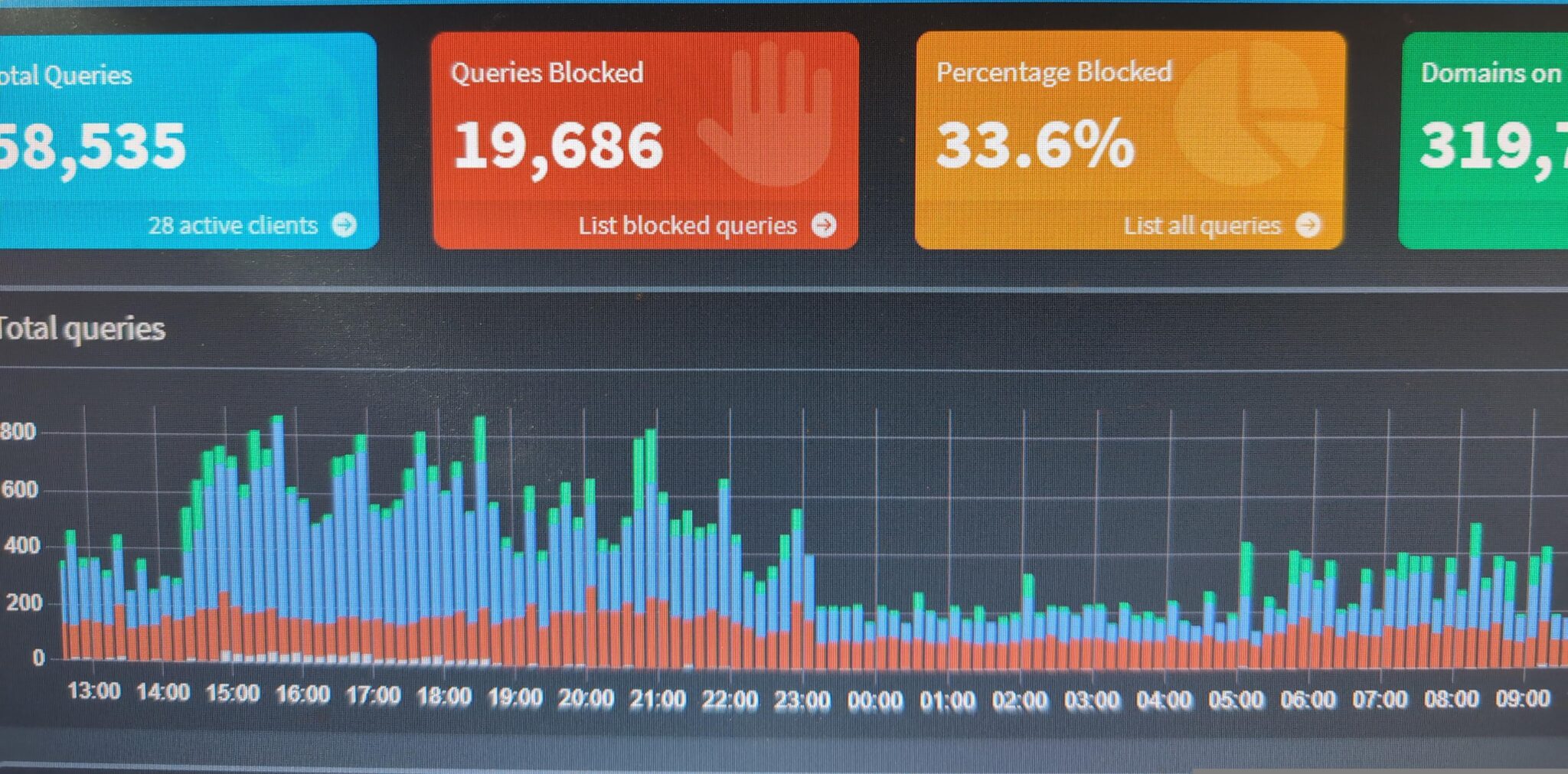
Unbound is a great partner container for Pi-Hole. While Pi-Hole manages block lists for security and privacy, it doesn’t do much with the DNS requests that pass the filter; it defaults to forwarding them on to standard DNS resolvers who handle the requests in exchange for data collection. Unbound, alternatively, manages resolving DNS requests forwarded from Pi-Hole with a minimum of passing data on for collection, even to DNS resolvers. It does this by acting as a recursive and caching resolving solution. This means that it keeps track of accessed domains locally by saving previous resolving endpoints (and importing DNS endpoint data regularly) and using that data to resolve DNS requests internally, minimizing the external data leakage. Further, Unbound can set Mullvad’s DNS over HTTPS and DNS over TLS as the resolver, leaning into a privacy focused DNS resolver as opposed to a data collection company who offers to resolve in exchange for tracking the user.
These are just some of the useful Docker containers, there are many others.
There are some Docker containers that can provide VPN connection services to other containers, computers, and devices in the network (Gluetun). One container can set up proxy services for the others (NGINX Proxy Manager), which is very useful for security as the user can limit both open ports and connecting sources to expected devices or domains exclusively. Another container, Watchtower, regularly checks the user’s other containers for available updates and either notifies the user or handles the upgrade process itself when they are found.
All of these containers add functionality, a user should evaluate them for security and suitability in their personal cloud server setup. This can involve a significant learning curve and time investment: Over time, expect to become something of a network engineer and IT maintenance person. It’s a huge pain in the ass, there is so much trial and error involved in getting all of the pieces in place and working in concert. My own learning process up to this point, culminating in this write-up that will immediately become dated, serves as a reflection on several years of personal trial and error. Use cases for this bit of technology include anyone and everyone that uses cloud services, recognizes the need for change, and is willing to put in the time to make and secure their own. Ideally, that’s everyone who reads this.
Phone – That Surveillance Device You Can’t Live Without
This one is difficult, there is not a lot of good news or recommendations about the surveillance device that is always in your pocket. There are specific devices where specific security and privacy options are available and the odds are that you do not have one of them. Before we get to those niche considerations, let’s talk instead about things that everyone can implement.
1) Secure your communications – use e2ee for communications that you would prefer not be compromised. Assume that all other methods are compromised by default, handle your interactions in those spaces accordingly. Signal is currently the best way to communicate with most people when using your phone. On Signal, you can hide your phone number, use an alias, and decline to connect your phone’s contacts. These can be helpful ways to compartmentalize and keep separate layers of privacy. Don’t assume that because you’re using an encrypted app that your messages are secure. Your communications are only as secure as the people that you are communicating with.
2) Let go of social media and other data collection apps – if you need to use them, use them from a sandboxed browser environment or, better yet, a different device entirely. Your device fingerprint, and other compromising data like location, are being recorded and sold by these apps constantly. See: https://nordvpn.com/blog/worst-privacy-apps/ This data can land in the pocket of the surveillance state and doesn’t require a warrant for them to gather and access; data brokers and social media companies are eager to do business with state and federal agencies.
3) Use Free and Open Source Software (FOSS) when available – At the moment, F-Droid Is a good alternate marketplace for Android apps outside of the Android App Store. Only privacy respecting and publicly audited apps are approved for distribution there. There is concern that in the coming months that Google is working to end the sideloading of apps, instead forcing everything run on an Android device to be approved by Google. See: https://f-droid.org/en/2025/09/29/google-developer-registration-decree.html
4) Leave your phone at home/Your phone is a snitch – this point is rooted in a piece of activist advice learned over the years by seeing the state use cell phone data in activist prosecution time and again. The context of the advice is to leave your phone at home when going to a demonstration or event where the state is sure to be surveilling. That’s not exactly how it’s being prescribed here but this comes from that. Instead, understand that your phone is always leaving a crumb trail when it is switched on, no matter what you do. Once you understand that, you can make informed decisions about when and where to leave those breadcrumbs. Do you always need it with you? How could you organize parts of your life to create separation from it? What would full phone liberation look and feel like?
A Secure and Private OS for a Handful of Devices
GrapheneOS is an Android-based operating system with security and privacy as their primary considerations. Similar to Tails, GrapheneOS offers the ability to maintain completely separate system profiles, preventing app and data cross-contamination. Similar to Docker’s containerization, GrapheneOS allows users to sandbox apps and to create isolated and independent system and device access on a per-app basis. Unfortunately, GrapheneOS is only available on a very narrow range of devices, the Google Pixel 6 through Pixel 10. See: https://grapheneos.org/
Mostly Full Linux on a Tiny Phone
Ubuntu Touch is a port of the Ubuntu Linux distro with specialized phone apps and capabilities. The same control over privacy and security is available here, which is essentially an open and customizable environment where the user is free to bring on necessary protections and given the choice to use privacy respecting open source software to minimize risks. As narrow as the GrapheneOS availability window is, it somehow looks huge in comparison to the Ubuntu Touch availability window. Ubuntu Touch can run on the Pixel 3, the Fairphone 4 and 5, and a collection of 3rd party devices not usually available in the United States. See: https://ubports.com/
The general conclusion here is that you should try to distrust your phone more and take it out with you less. There are some things you can do to try and make any device more private and secure and a few fairly drastic measures that a very small number of devices can take to achieve a higher level of privacy and security. In the end, though, all of these devices will still be regularly recorded and tracked by the nearest cell phone towers. Users should be aware of that and take into consideration that full invisibility with these devices is just not possible while they are functional as phones.
Devices – LoRa and Mesh Technology
LoRa technology offers low-cost, energy-efficient, sometimes-secure, communications across regions using radios and across the internet using access points. The devices themselves, at least in the United States, operate at the 3G radio frequency. Users familiar with the range and capability of 3G phones will have some concept of the range available here. A major difference is antenna size and location restriction: powerful transmitters need a special license and most operators don’t have towers for antenna placement above buildings. Early signal dropoff in urban and heavily wooded areas is regularly experienced. Open line of sight between devices in ideal conditions, though, produces truly impressive range results from the antennas and transmitters. These devices can be used regardless of external conditions: as long as devices have power and signal range in their favor, users can have a way to communicate over long distances. This immutable capability, external of power grid or cell tower functionality, makes LoRa a favored technology of outdoor adventurers and preppers.
LoRa devices are being used to make mesh networks based on connected devices adding their range and connections to a larger network. The way these networks work is that each node, or potential message recipient, offers to pass on messages for others while they are connected to, and waiting for their own messages from, the network. With a system running this way, a message from a person on one side of town can reach a person on the other side of town as long as there are nodes in between willing to forward the message.
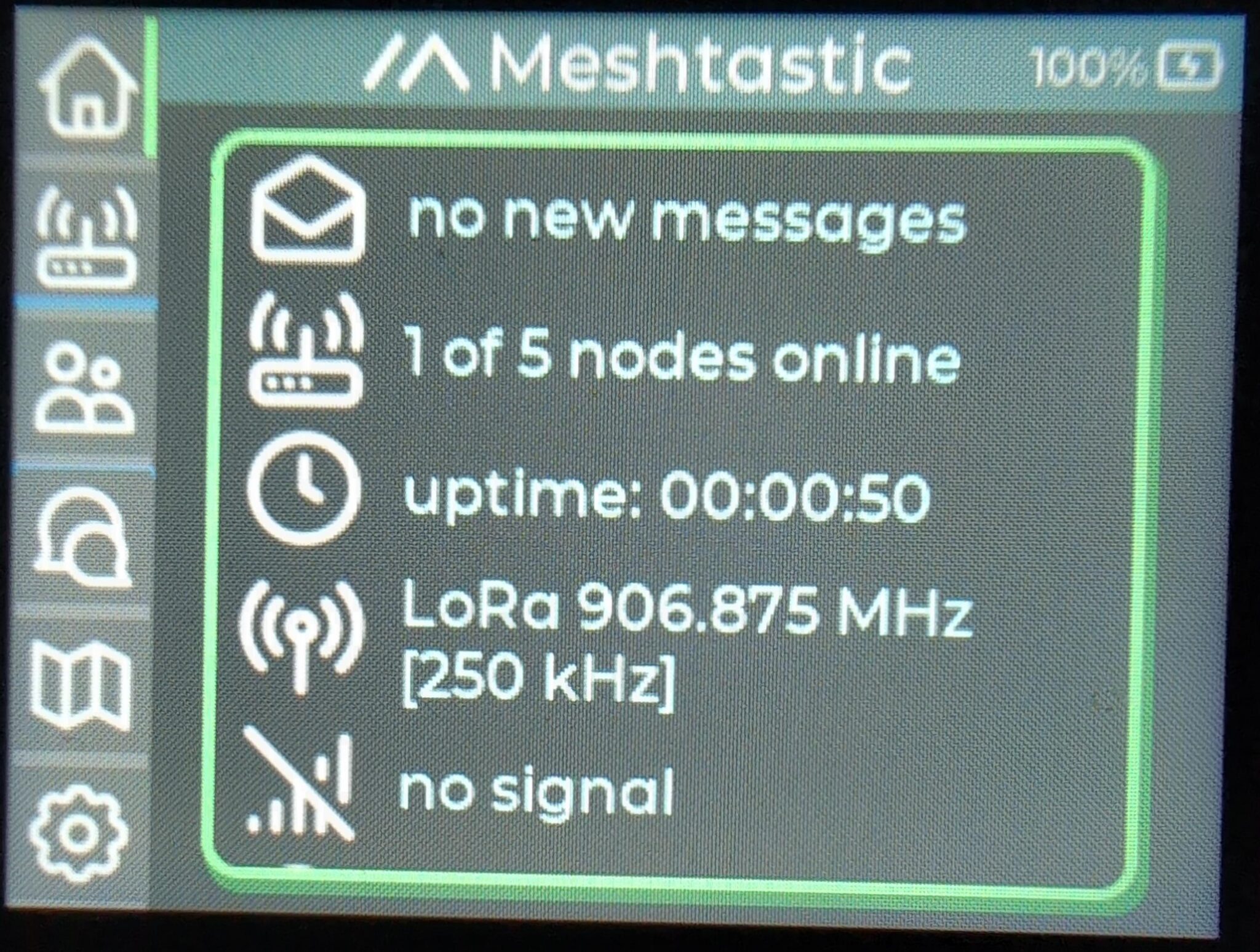
Currently, LoRa devices are available in primarily 2 form factors. The first is as receiver/repeater relay radios (~$35). This is the format with a barely usable screen and not enough buttons to do anything meaningful. These devices are meant to act as simple relays to devices with input and output capacity, a computer terminal, tablet, or phone for example. The other format is a standalone handheld with a keyboard that resembles a rugged 2000s Blackberry (~$90). These standalone devices are quite limited in what they can do but they don’t require a separate device for basic usage. One notable thing about the standalone devices is that users can install a launcher on them to gain the ability to switch between Meshtastic, MeshCore, and Reticulum.
While there is convergence in use cases for these devices, a user can access LoRa communication with either, after all, they do differ in what a user might want from them and use them for. The relay radio is a device that someone might set up as a repeater node with a solar panel, leaving it to provide service to an area, or connect to a device with more input and output options. The handheld is more of a bring-along-ready device, a user can even load maps onto it and use it for basic navigation. A nice thing about the devices is that they can work in concert, either device can relay to the other and both give the user access to LoRa communication. There’s not necessarily a wrong choice here, there’s just different ways to benefit from each.

A Public Mesh for the Whole Community
Meshtastic is the most popular emerging software for LoRa device communication. It’s fairly straightforward to deploy, it’s got a large userbase, and it’s trivial to connect your local nodes to other networks using an internet access point. A shortcoming of Meshtastic is that it’s prioritized network maximization over trust. It’s a good platform for first adoption in an area, it demonstrates a proof-of-concept really well, but you may find your device connected to a node that should be considered unsafe. Use cases would be early adopters during an establishment phase in an area where users are first getting into the tech and not concerned about being in network with bad actors in their community.
A Private Mesh Alternative
MeshCore uses the same relay concept as Meshtastic with a layer of trust needed in order to connect devices. These trusted nodes can be more difficult to find and establish so, while this application of the technology is preferable, it’s often not feasible in emerging areas except between devices intentionally connected by an individual or organized group. A use-case for this platform would be an established mesh network moving into more secure comms.
A Secure Mesh Internet
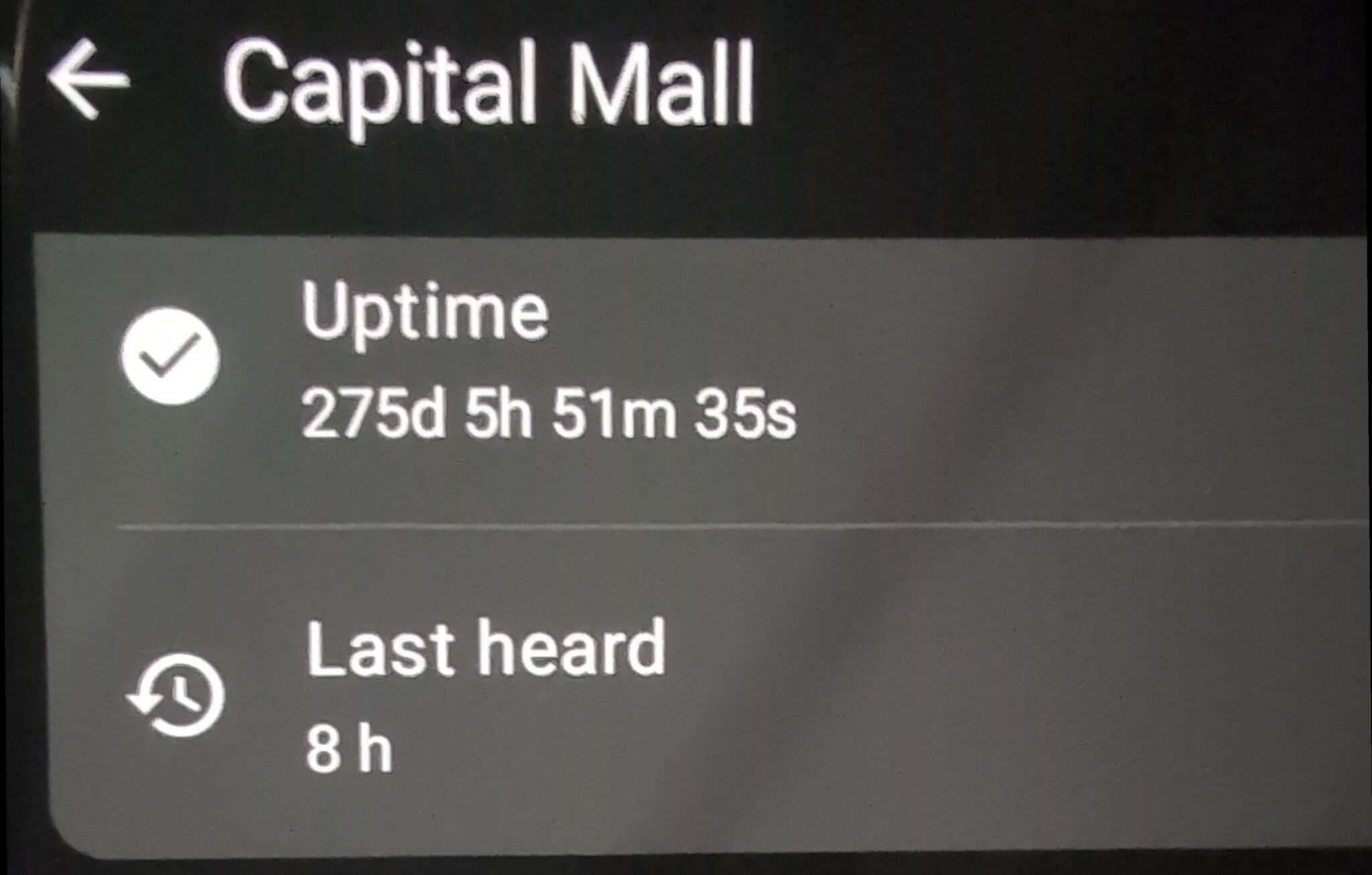
Reticulum uses the node and mesh system combined with cryptography to send and receive encrypted packets between devices. These packets can contain message data, similar to the others, but they’ve also been used to relay simple, text-only, web pages using a special lightweight markdown formatting language. In Reticulum, each node can receive packet data from other nodes but also stands ready to serve basic web page packet data to any nodes that request it. At regular, defined, intervals, the users’ nodes broadcast their unique identifier, like an IP address, letting other nodes know that it’s there and ready to serve a web page. Other users can then request the page and have a look at what that user felt was worth sharing.
An interesting thing is that as long as 1 node in a network is connected to the regular internet, users elsewhere in that network can connect through that node and access, and be accessed by, all of the remote internet networked nodes and their local networks. This creates a sprawling text-only network that exists both across the internet and outside of it.
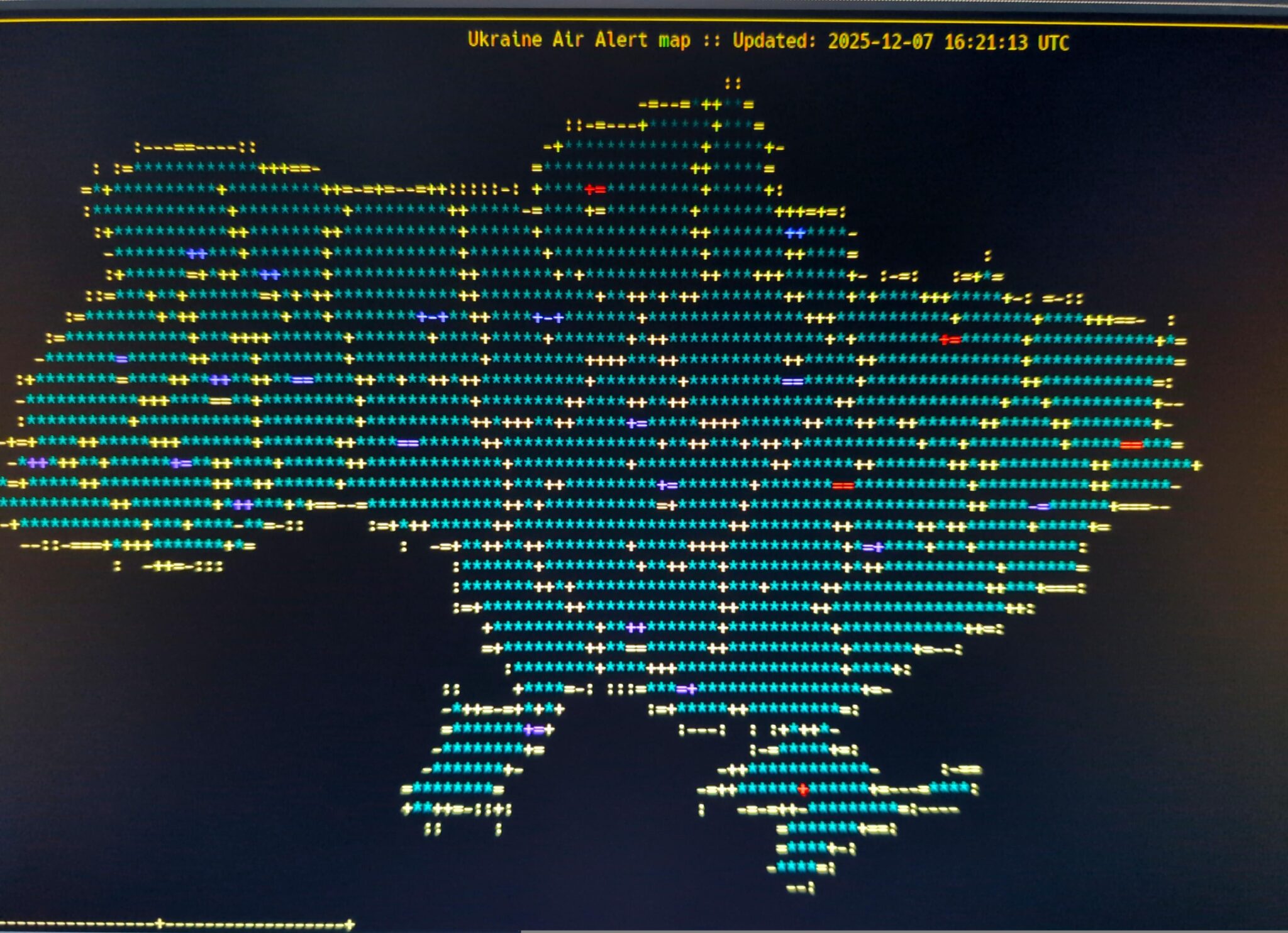
On this text-only internet-like network, users have built a lot of creative pages. One serves hundreds of recipes, another offers a mesh version of social media (a Twitter-style clone). There are a lot of message boards, some chats, and several militia-looking group recruitment advertisements. There are pages that give updates regarding various international conflicts: one page offers live updates of those killed in Palestine and another draws a map of Ukraine using colors and symbols to indicate how things are going on various fighting fronts in the country.
It is really incredible seeing nodes announce, taking a look at their page, and discovering a user hosting zines or thoughts on mutual aid. Users of this tech are enthusiasts, people who embrace the 80’s style text-only pages and those who see the value of encrypted anonymous mixed off-grid/on-grid communication as a way to share ideas and information about things that they care about.
The downside of LoRa communication is that, in our utilization of them, they require other nodes to be truly useful. A single enthusiast could, with determination, set up an entire network across an area and only communicate between their own devices. There’s some use-cases where external input is not needed or wanted: A rural farm, for example, may only want to use LoRa to network devices across the work area and prefer no outside input. Our implementation of the technology, though, begs for community buy-in. As people join the network, the reach of individual devices grows. Eventually, like in well-established Seattle, users can have access to nearly fully mesh coverage in most places they go. We see this as a potential pathway to ditching phones while staying in communication with the community and are extremely interested in seeing that capacity grow.
Wrapping Up
We are currently in a tech dystopia. AI is tracking us everywhere we go all of the time. The developers of all of that tracking technology have been honing it on Palestinian bodies where it has been used in conjunction with drones and other militarized violence to summarily execute large swaths of the population. We are past the point of ignorance, there is no excuse for naivete about how this data can be used against us. We should look at ways this information is used, the harm that it can cause, and refuse to help the militarized surveillance state expedite the destruction of our communities and the social fabric that binds us together.
Fortunately for us, the construction of this dystopia created a huge cache of discarded technology. As effective as these systems may be, their failures and false starts littered the landscape with useful, and now extremely cheap, technology. We can recover this tech and turn it to our favor. An old computer can become a personal cloud server, old tablets can be their access points. Cheap radios plugged into single board computers, like those found in many smart home devices, can become nodes in a network of off-grid communications.
Readers shouldn’t put trust in this writing. It should be read as the best guesses and ideas of a small group of people who have spent some time exploring this technology. Instead, readers should explore the concepts presented and build trust in themselves and their community to interpret and utilize the ideas shared here. Readers are invited to grow their capacity to examine these things and build upon them and shape them to their need. All power to the people.
NOTE: This entire document was prepared from, and housed on, a server running Nextcloud Office. The cloud-based word processor was connected to from a flash drive instance of Tails running on a wired data connection. Writing took several days with regular breaks. Overall, the experience was decent, but slow, after resolving initialization issues. Once settling on the method to utilize the tech – and after accepting limitations in other attempts – firing up the drive and sitting down to write was still extremely slow, like “go get a cup of coffee while you wait” time to kill during boot. It was, however, straightforward: I was able to reestablish connection to my writing and pick back up where I left off without much difficulty.
One issue experienced was that Bluetooth connections do not happen early enough in the boot phase to use a Bluetooth keyboard to trigger the boot menu to choose the Tails boot option. Switching to a 2.4GHz wireless keyboard did not resolve this, though it did initialize earlier in the boot phase. A wired keyboard resolved this issue entirely.